
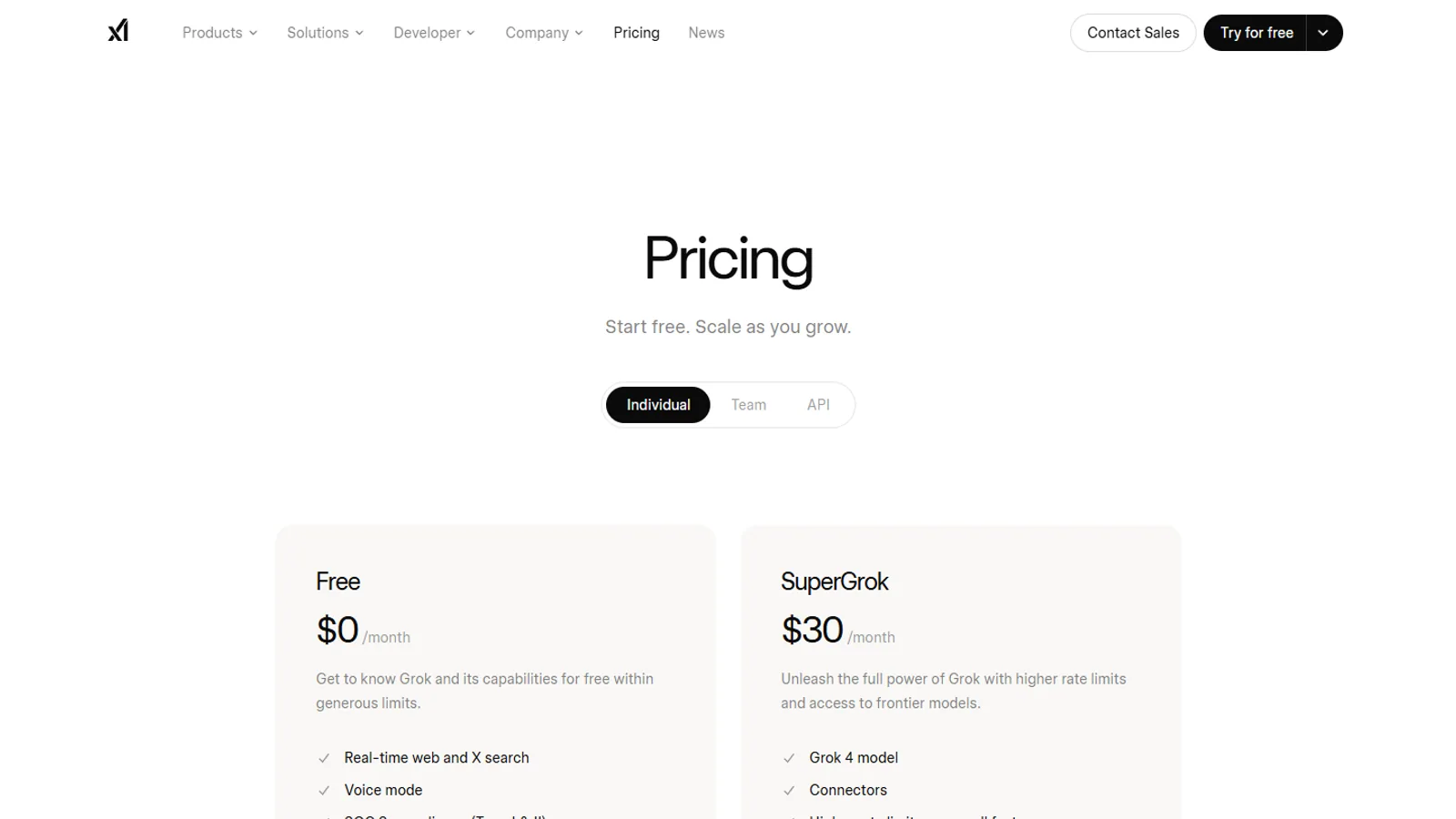
Verify current prices and limits at x.ai before subscribing. Start with the free plan (Personal Workspace), then move to a paid plan such as SuperGrok or SuperGrok Heavy only after you hit a real limit, since paid plans share a weekly usage allowance you can top up with Extra Usage Credits.
As of June 29, 2026, xAI offers a free tier (its official free workspace is named Personal Workspace) plus paid plans including SuperGrok, SuperGrok Heavy, Business, and Enterprise. You may also see the label "SuperGrok Lite" used as a lower-cost paid option, though that name comes from third-party write-ups rather than xAI's own pricing page, so confirm the exact plan names at checkout. This guide explains how to choose among them without pretending that a static article can safely mirror every live price.
Plan comparison
| Plan path | Best fit | What to verify |
|---|---|---|
| Free | Testing Grok casually | Daily limits, model access, regional availability |
| SuperGrok Lite | Lower-cost paid usage | Whether the limits solve your actual bottleneck |
| SuperGrok | Regular personal use | Included features, renewal terms, app or web access |
| SuperGrok Heavy | High-volume personal use | Capacity, priority, and whether the cost matches your workload |
| Business | Team or organization use | Admin controls, billing, compliance, seats |
| Enterprise | Larger organization needs | Contract terms, security review, custom support |
Why exact prices can mislead
Subscription pages can vary by region, tax, currency, app store, promotional status, and checkout path. A copied price table can become wrong within days. That is why SuperGrok.tech records plan names and decision criteria, then links to xAI for the purchase moment.
That choice is less flashy than a big price graphic, but it is clearer for readers.
How to choose
Free
Use Free when you have not tested Grok with your real prompts. A free trial period of your own behavior is more useful than reading another broad review.
SuperGrok Lite
Consider Lite when free access is useful but you do not need heavy capacity. The key question is whether Lite removes the limit you actually hit.
SuperGrok
Consider SuperGrok when Grok is part of your regular workflow: research, writing, coding support, X context, summarization, or general AI comparison.
SuperGrok Heavy
Consider Heavy only when you already know why standard paid access is not enough. Heavy should be a workload decision, not a status decision.
Business and Enterprise
Business and Enterprise need a separate evaluation. Look for seat management, data handling, contracts, billing, admin controls, and support terms. Do not treat a consumer plan review as business procurement advice.
Purchase checklist
- Check xAI pricing in your country and currency.
- Confirm whether you are buying through xAI, Grok, an app store, or X.
- Read renewal and cancellation terms on the checkout page.
- Screenshot your receipt for your own records.
- Re-check your plan after major xAI announcements.
Checkout verification record
Before you subscribe, copy this record into your notes and fill it in from the official purchase page:
| Field | What to record | Why it matters |
|---|---|---|
| Plan name | The exact plan label shown at checkout | Plan names can be similar |
| Seller | xAI, Grok, X, Apple, Google, or another billing surface | Cancellation depends on seller |
| Country or region | The store or billing region shown | Availability and tax can differ |
| Currency | The currency shown on the payment page | Avoid comparing against someone else's screenshot |
| Tax handling | Included, added later, or not shown yet | Final price can differ from headline price |
| Renewal date | Date and billing period | Prevent surprise renewals |
| Cancellation path | Where the seller says to manage the subscription | Saves time if you downgrade |
| Timestamp | Date you checked the page | Helps when product pages change |
This record is not a substitute for official terms. It is a practical way to avoid losing the purchase context after the page changes or the receipt goes into an inbox.
How to think about value
The value of a Grok plan is not only the monthly price. It is the relationship between cost, access, reliability, and the work you repeat often.
Ask four questions before upgrading:
- What limit did I hit?
- How often did I hit it?
- Did that limit stop useful work or just interrupt casual use?
- Does the next plan clearly solve that limit?
If you cannot answer all four, the safer decision is to keep testing. This is especially true if you are choosing between SuperGrok and SuperGrok Heavy.
Plan-to-problem decision tree
Start with the problem, then map it to a plan path.
If the problem is curiosity, use Free or the lowest available test path. Curiosity is a good reason to test a tool, but it is not a strong reason to start with a high tier.
If the problem is occasional limits, identify the exact limit first. A lower paid plan may solve it. If you cannot describe the limit, keep testing.
If the problem is daily work friction, compare Lite and SuperGrok against your routine. Ask whether you use Grok for research, writing, X context, study, coding help, or planning often enough for the cost to make sense.
If the problem is sustained heavy sessions, read the Heavy comparison before buying. Heavy should be a response to repeated capacity pressure, not the first paid experiment.
If the problem is team access, check Business or Enterprise. A personal plan may create ownership and billing confusion for a team.
If the problem is software development, read xAI Docs and API details. Consumer plans and API usage answer different questions.
Common plan mistakes
Mistake one: buying the highest tier before testing the free or lower paid path. This can waste money because you do not yet know your real limit.
Mistake two: treating X Premium, Grok app access, SuperGrok, and API usage as the same purchase. They are related but not interchangeable.
Mistake three: relying on an old screenshot for price or limits. The only reliable purchase moment is the official checkout page you see in your account and region.
Mistake four: ignoring renewal and cancellation details. A plan that is easy to start can still be annoying to manage if you do not know where billing lives.
Mistake five: buying a personal plan for a team problem. Teams often need support, account ownership, billing controls, and data review.
Avoiding these mistakes matters more than finding a clever shortcut. The best plan decision is usually the one with the fewest surprises.
App store purchase versus direct purchase
Some readers may see Grok through a mobile app store. Others may see a direct xAI or Grok checkout. The surface matters because billing, renewal handling, cancellation steps, taxes, and local currency display can differ.
Before buying through an app store, check:
- Which account receives the subscription.
- Whether the plan renews through Apple, Google, X, xAI, or another surface.
- Where cancellation must happen.
- Whether the shown price includes taxes.
- Whether features are described the same way as xAI's own pricing page.
Before buying directly, check:
- The renewal date and billing period.
- The email tied to the purchase.
- Any usage language shown at checkout.
- Whether the plan is personal, business, or developer-focused.
App Store vs direct billing: reader scenarios
Scenario one: you subscribe from an iPhone because the app listing is the easiest path. Your billing may be managed through Apple. If you later want to cancel, the cancellation path may live in Apple subscription settings rather than a Grok web page.
Scenario two: you subscribe from an Android device. Your billing may be handled through Google Play. Check the account email and renewal page before assuming it is tied to another email.
Scenario three: you subscribe directly on a web checkout. Your receipt, cancellation link, tax handling, and renewal terms may be different from app-store billing.
Scenario four: you access Grok through X. Your account settings and feature availability may depend on X's product surface and help pages.
None of these paths is automatically better. The right path is the one where you understand who bills you, where you manage the subscription, and which product surface you actually plan to use.
Renewal review checklist
Set a reminder a few days before renewal and ask:
- Did I use Grok enough this month to justify the plan?
- Which tasks would have been harder without it?
- Did I use the plan on mobile, web, X, or another surface?
- Did any official xAI announcement change what I should check?
- Would a lower plan now be enough?
- Should I compare Grok against another AI subscription before renewing?
The renewal review should be short. If you need more than a few minutes to remember why you pay, that is useful information by itself.
Consumer plans versus API usage
Consumer Grok plans and xAI API usage should not be treated as the same purchase. A reader who wants the Grok app for everyday questions is making a different decision from a developer who wants model calls inside software.
If your goal is app usage, focus on plan names, mobile access, X access, and included features. If your goal is development, focus on xAI Docs, model names, API pricing, rate limits, and production requirements.
That distinction prevents a common mistake: buying a personal plan and expecting it to answer developer billing questions.
Country and currency checks
Countries and regions can see different store behavior because app stores, taxes, and local regulations vary. Even when the plan name is the same, the final checkout details may differ.
If you are outside the United States, check the purchase flow directly in your country. Do not rely on someone else's screenshot. If you travel or use multiple accounts, make sure the country, store account, and payment method match the place where you expect to use the subscription.
What to record after subscribing
After you subscribe, save the details you may need later: plan name, purchase surface, renewal date, billing email, receipt source, and cancellation path. This is not exciting, but it prevents confusion when a plan renews or when you want to compare against another AI subscription.
Also record the reason you upgraded. Write one sentence such as "I upgraded because I hit limits during daily research" or "I upgraded because I need Grok on mobile several times a week." If that sentence stops being true, the plan should be reviewed.
After major xAI changes: what to re-check
When xAI announces a new Grok model or changes plan positioning, re-check these items:
- Does your plan still have the same name?
- Did the official pricing page change the plan description?
- Did model availability change for the product surface you use?
- Did app listings describe new features or limits?
- Did X Help change Grok-on-X language or settings guidance?
- Did developer docs change model names or API details?
Use the model timeline as a trigger for this review. A news release may affect your plan, but it may also affect only a specific app, API, region, or rollout stage. The re-check keeps excitement separate from buying decisions.
Refund and cancellation notes
This guide cannot promise refund rights. Refund rules can depend on the seller, country, app store, billing route, and timing. The safest path is to read the live checkout terms before purchase and save your receipt.
If you subscribe through Apple or Google, cancellation may need to happen through that store. If you subscribe directly, cancellation may happen through the direct account or billing portal. The official purchase path should tell you where to manage it.
Upgrade decision examples
Choose Free if you are still learning whether Grok fits your routine.
Choose Lite if you want a lower-cost paid test and your expected usage is modest.
Choose SuperGrok if Grok is useful several times a week and free access is clearly limiting you.
Choose Heavy if you have sustained usage and already know that standard paid access is not enough.
Choose Business or Enterprise if the subscription is for a team, company, procurement review, or data-governed environment.
Example buying paths
Personal casual path: you try Free for a week, ask the same kinds of questions you normally search for, and only upgrade if you hit a limit that interrupts a useful task. This reader should not start with Heavy.
Personal regular path: you use Grok for planning, writing, current-topic explanations, and comparing AI answers several times a week. You check xAI pricing, choose the lowest plan that solves the limit, and set a reminder to review after one billing cycle.
Heavy research path: you run long sessions, ask many follow-up questions, and use Grok as one of your primary AI tools. You test SuperGrok first unless the official plan language and your usage clearly point to Heavy.
Team path: you are buying for more than one person. You should stop reading consumer plan advice as the main guide and check Business or Enterprise details, because account ownership, billing, support, and data handling matter.
Developer path: you want model calls in software. You should open xAI Docs and API pricing rather than assuming a consumer plan answers developer questions.
Bottom line
Most readers should start with Free, move to SuperGrok Lite or SuperGrok only after hitting a real limit, and reserve SuperGrok Heavy for high-volume usage. If you are buying for work, evaluate Business or Enterprise through official xAI channels.
Next, compare SuperGrok Heavy vs SuperGrok or read what SuperGrok is.
Questions readers ask
Why does this page not list exact prices?
Because prices, taxes, currencies, trials, and plan limits can change by country and purchase surface. xAI pricing is the source of truth.
Which plan should a new user start with?
Most new users should test the free plan first, then upgrade only if they can name the specific limit or workflow that blocks them.
Is SuperGrok Heavy for everyone?
No. Heavy is for users who need more capacity or priority than standard paid usage. Casual users should not start there.
Sources checked
- xAI pricingxAI
- xAI developer modelsxAI Docs
- About Grok on XX Help